Delivery scorecard
The delivery scorecard of a project answers "how is this project delivering?" with a handful of numbers Yontrack takes from its own data — its builds, promotions, deployments, test validations and security scans. Nothing is entered by hand.
Note
The scorecard of a project on its own is available to everyone. Reading projects together in estates, with targets, is under license — see License.
The model
- Reading
- One measurement of one project at one moment — its lead time, say — for one set. A reading says what it came to, over which window, and which branches it read.
- Scorecard
- The readings of one project: what its project page shows.
- Set
- Every project is read on its own, in the no-estate set, shown as the Project set. A project which belongs to estates is read again for each of them, against the estate's marker, windows and targets.
- Marker
- The event a delivery reading measures up to: a promotion granted, or an environment reached.
- Window
- The period a reading is taken over: the last 90 days by default, back from the time it is computed. See Settings.
- Scope
- The branches a project is read on: its non-disabled branches matched by its branch model, or every non-disabled branch when the project has no branch model — a project with no SCM. A reading records its branches and which of the two cases applied.
Basis
Every reading has a basis, which says what its value rests on:
| Basis | Meaning |
|---|---|
MEASURED |
Measured from Yontrack's own data. |
UNKNOWN |
Yontrack cannot see what the reading needs. There is no value, and an unknown reason says why. |
ESTIMATED |
Reserved for imported history. Yontrack 6 never produces it. |
Sets
The no-estate set exists for every non-disabled project. It is read up to each branch's last promotion level — the last one in the order of the branch's promotion levels. Branches without any promotion level are not read, and the samples of all the branches read are pooled together. The no-estate set has no target: it is shown, never judged.
An estate adds a set of readings to each project it selects, with its own marker, windows and targets. A project's no-estate readings are the same whether or not it belongs to an estate. See Estates.
The readings
Nine readings make the catalogue. The four delivery readings are read up to the marker; the two quality readings read the test validations of the branches in scope, and the three security readings their security scans and findings, whatever the marker.
| Reading | Key | Unit | Better when |
|---|---|---|---|
| Lead time | delivery.leadTime |
Duration (median) | lower |
| Frequency | delivery.frequency |
Per week | higher |
| Success rate | delivery.successRate |
Percentage, 0 to 100 | higher |
| Time to restore | delivery.mttr |
Duration (median) | lower |
| Test pass rate | quality.testPassRate |
Percentage, 0 to 100 | higher |
| Test flakiness | quality.testFlakiness |
Percentage, 0 to 100 | lower |
| Security maturity | security.maturity |
Rung, 0 to 3 | higher |
| Remediation time | security.remediationTime |
Duration (median) | lower |
| Overdue findings | security.overdue |
Count | lower |
Through the API, durations are given in seconds. A duration reading keeps the median as its value; its 90th percentile, mean, minimum, maximum and sample count are in its details. There is no minimum number of samples: the count is always shown beside the value.
Up to a promotion
When the marker is a promotion level — always the case with no estate — on each branch read:
- Lead time
- From the creation of a build to its first promotion run at the level. A build counts in the window where it was first promoted.
- Frequency
- The promotion runs at the level in the window, every one of them, per week. The raw count is in the details.
- Success rate
- The share of the builds created in the window which were promoted at the level, leaving out the builds in flight: those created within the window's median lead time before its end. They have not had the time a build usually takes to be promoted, so their not being promoted says nothing yet. The details give the number of builds counted, promoted, and left out as in flight.
- Time to restore
- How long the path to the level stays broken. An outage starts with the first unpromoted build following a promoted one, and ends with the next promotion on that branch. For B1 promoted, then B2, B3 and B4 not promoted, then B5 promoted, the outage goes from the creation of B2 to the promotion of B5. An outage counts in the window where it was restored. Unpromoted builds before the first promotion of a branch are not an outage — nothing was promoted yet to be restored — and an outage started by a build in flight is not a failure yet. The details also give the outages still going on at the end of the window.
Up to an environment
When an estate names an environment as its marker — or defaults to one — the delivery readings read the deployments of the project's slot in that environment:
- Lead time
- From the creation of a build to the end of its first
DONEdeployment in the slot. A redeployment of the same build does not reset it. - Frequency
- The
DONEdeployments in the window, per week, counted at their end. A redeployment counts. - Success rate
DONEoverDONEplusFAILEDdeployments in the window. ACANCELLEDdeployment is left out entirely.- Time to restore
- From a
FAILEDdeployment to the nextDONEone in the same slot; consecutive failures make one outage, from the first of them. It is the time to restore the deployment path, not an incident's time to restore, which Yontrack cannot see.
Only the slot with the marker's qualifier is read — the default slot, unless the estate names a qualifier. Qualifiers are never pooled: a build deployed to a canary and then to the main slot would be counted twice.
Test readings
A test stamp is a validation stamp whose data type is
Test summary (tests). The test readings look at the
builds created in the window, on the branches in scope, which have at least one run on a test
stamp:
- Test pass rate
- The share of these builds whose latest run passed, on every test stamp they were run on.
- Test flakiness
- The share of these builds where some test stamp has a
FAILEDrun followed — immediately or not — by aPASSEDone.
Security readings
A scan is a run of a security-findings validation stamp — a run posted with the report of a
security scan — on a branch in scope. Its kind is the one
the report was sent with — IMAGE, CODE, SECRETS, DAST, DEPENDENCIES or OTHER — and its
status is the one the thresholds of its stamp gave it when it was created. A scan sent before
Yontrack 6 recorded the kind has the kinds of the findings it reported.
- Security maturity
-
How far the project has climbed a ladder of four rungs. Each rung needs the ones below it, and the rung is the value, shown as
2 · Covered:Rung Name Reached when 0 None No scan in the window. 1 Reported A scan in the window. 2 Covered Every kind of scan the estate expects has a scan fresher than its freshness. With no expected kind — as always with no estate — some scan is fresher than it. 3 Gating A security-findingsstamp is required by a promotion level of its branch, through its auto promotion, or a scan was createdFAILEDin the window.In the UI, a rung says what it means on hover and on keyboard focus, and the ⓘ of the reading lists the four rungs, Covered in the terms of the set — Every expected kind scanned within the last 7 days: Code, Dependencies.
The freshness is the estate's, else the Security scan freshness of the settings: a scan is fresh when it is younger than that many days at the time of the reading, even if it is older than the window. The maturity is never unknown: no scan reads 0. Its details give the scans of the window, the kinds expected, fresh and missing, the failed scans, the stamps required by a promotion and the time of the latest scan.
- Remediation time
- How long the
CRITICALandHIGHfindings of the project stay open, measured on their exposure episodes: an episode is the union of the exposure periods of a finding on the branches in scope — periods which overlap or touch merge, with no gap tolerance. One sample per episode ending in the window, from its start to its end. A finding which was fixed, came back and was fixed again gives one sample per fix, the time it stayed fixed left out; a fix applied onmainand on two release branches gives one sample, which ends with the last of them — so a vulnerability fixed onmainand still exposed on a release branch is not remediated yet. The median goes in the value, with the 90th percentile, mean, minimum, maximum and count in the details. The location of a finding carries no version: bumping a dependency to a version which is still vulnerable does not end its episode. It reads the same in every set, and needs no target to be measured. - Overdue findings
- The open
CRITICALfindings older than the estate's CRITICAL remediation target, plus the openHIGHfindings older than its HIGH target, at the time of the reading. The age of a finding runs from the start of its current exposure episode on the branches in scope — a reopened finding starts again from its reopening — and a finding is overdue once strictly older than its target. An estate with a target for one severity only judges the findings of that severity; with no target at all — the no-estate set, or an estate with neither — the reading isUNKNOWN (NO_TARGET). Its details give the open and overdue findings of each severity, the targets, and the start of the current episode of the oldest overdue finding.
For both remediation readings, the severity of a finding is the highest it was ever reported with,
and an accepted finding is neither open nor resolved: the accepted CRITICAL and HIGH
findings are counted apart, as accepted in the details.
Unknown readings
A reading Yontrack cannot take is UNKNOWN, with one of these reasons:
| Reason | Meaning |
|---|---|
NO_MARKER |
No marker to read up to: no branch in scope has the promotion level, or the project has no slot in the marker environment with that qualifier, or that environment does not exist. |
NO_SAMPLES |
Nothing to measure in the window: nothing reached the marker, no build was run on a test stamp, for the time to restore an outage is still going on and none was restored, or — for the remediation time — no exposure episode of a CRITICAL or HIGH finding ended in the window. |
NO_FAILURE |
Time to restore only: nothing failed in the window, so there was nothing to restore. Shown as No failure in window, a neutral state rather than an unknown one. A time to restore never reads 0. |
NO_TEST_STAMP |
Test readings only: no test stamp on the branches in scope. |
NOT_LICENSED |
Delivery readings up to an environment, when the license does not include the environments. |
NO_TARGET |
Overdue findings only: no remediation target to judge the findings against — the no-estate set, or an estate with neither a CRITICAL nor a HIGH target. Shown as No target set, a neutral state rather than an unknown one: nobody set a target, nothing went wrong. |
Computing the readings
The readings are computed once a day, by default at 02:00 in the time zone of the server, and kept as daily snapshots, which is what gives each reading its history. Computing again on the same day replaces that day's snapshot. Snapshots older than the retention — 730 days by default — are deleted by the daily computation.
- The no-estate set of every non-disabled project is computed by the job Delivery scorecard / Readings computation / no-estate; each estate has its own job, for the projects it selects.
- A project whose computation fails gets no snapshot that day: the failure is logged, and counted
by the
ontrack_readings_errorsmetric. The scorecard keeps showing the last snapshot, with its date. - Recompute, on the project page, computes the readings of the project again, in every set it is in, replacing the day's snapshots. It needs the right to configure the project, and it is queued as a job rather than run on the spot.
Settings
The Delivery scorecard settings, in System > Settings, hold:
| Setting | Default | Meaning |
|---|---|---|
| Window | 90 days | Number of days a reading is taken over. An estate may override it per reading. |
| Retention | 730 days | Number of days the daily snapshots are kept. |
| Schedule | 0 0 2 * * * |
Cron schedule of the daily computation, in the time zone of the server. |
| Security scan freshness | 7 days | Number of days a security scan stays fresh, for the security maturity of a project read with no estate, and of an estate which sets none. |
As code:
ontrack:
  config:
    settings:
      delivery-scorecard:
        windowDays: 90
        retentionDays: 730
        cron: "0 0 2 * * *"
        securityFreshnessDays: 7
On the project page
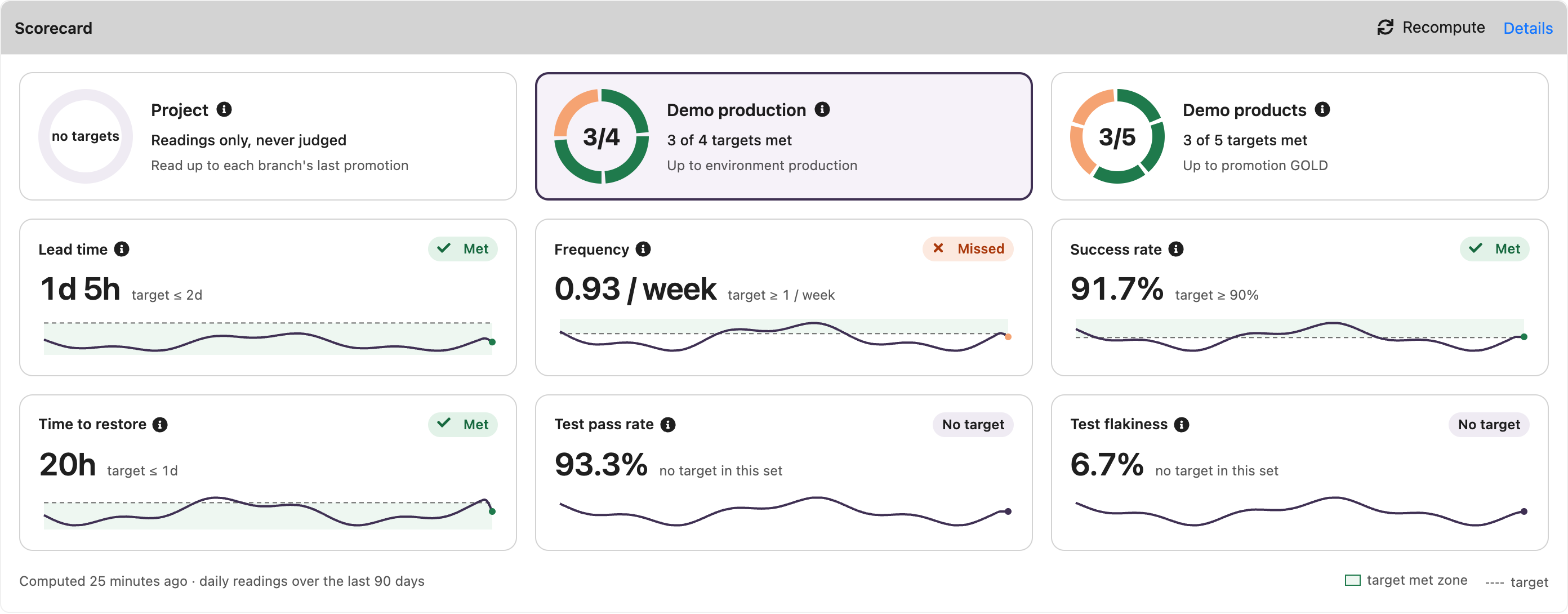
The project page has a Scorecard section, with one card per set: Project first, then one per estate the project belongs to, by name.
- An estate's card has a ring with one segment per reading judged against a target — the met ones first, then the missed ones — and the headline N of M targets met, with the marker the estate reads up to. This is a count, not a score: the readings are never combined into one number, nor weighted. A reading with a target which cannot be judged — unknown, or with no failure in the window — is left out of the count, and mentioned beside it (1 not judged). An estate with no judged reading has no ring.
- The Project card reads no targets: the project on its own is never judged.
The first estate is selected by default, or Project when the project belongs to no estate. Under the cards, the readings of the selected set are tiles, each with:
- its name, and an ⓘ saying what it measures, up to the marker of the set — for the security maturity, its four rungs, the current one and the target one marked;
- its judgement, always in words: Met, Missed, No target, Unknown — with its reason on hover — or, neutral, No failure in window or No target set;
- its value, and its target (target ≤ 1d), or no target in this set;
- a sparkline of its daily snapshots over the last 90 days, the target dashed and the zone where it is met shaded — below the target when lower is better, above it when higher is — with today's point in the colour of the judgement. The unknown days are left as gaps, and a trend needs several days of snapshots.
Met and Missed never rest on colour alone: each comes with an icon and a word. The ⓘ next to a card says what the set is — the project on its own, or the estate with its description, its marker and the labels which put the project in it. The ⓘ opens on hover and on keyboard focus.
The section says when the readings were last computed, carries the Recompute command, and its Details link opens the scorecard page of the project on the selected set. The selection is not kept.
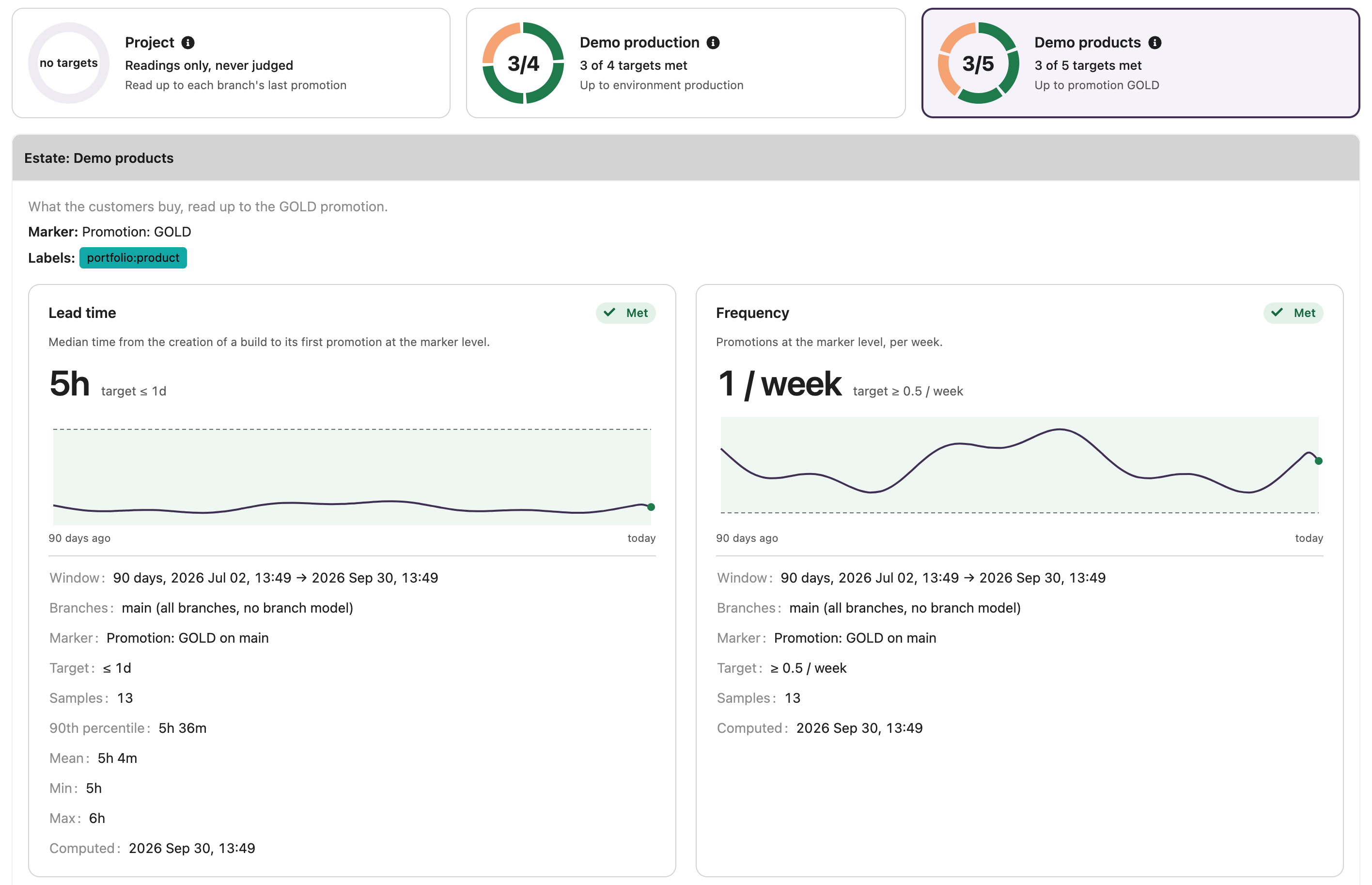
The scorecard page of the project answers "why is this number what it is?". It has the same
cards at the top, and shows the readings of the selected set only. The selected set is in the URL —
?set=project, or ?set= and the name of an estate — so that a link lands on it; an unknown set
falls back on the default one. Under the cards, the page says what the set is — its description,
its marker and, for an estate, its labels — and gives one large tile per reading, with:
- what the reading measures, up to the marker it was read up to;
- its judgement, its value and its target, and a larger chart of the last 90 days;
- the window, the branches read and whether they come from the branch model or are all of them;
- the marker used, for the delivery readings;
- the target, and what explains the value: the sample count, the 90th percentile, mean, minimum and maximum of a duration, the builds promoted out of those counted and the builds left out as in flight, the outages still open, the deployments done and failed, the builds passed or flaky, the test stamps read, the kinds of scan fresh and missing, the failed scans, the open and overdue findings and the accepted ones;
- when it was computed.
On a dashboard
The Project scorecard widget shows the scorecard of a project on a dashboard: a tab per set, the ring of the targets met in an estate and its judged readings, and a link to the scorecard page on the set shown.
The estate view shows the readings of every project of an estate side by side.
The scorecard is on the desktop UI only: the mobile UI does not show it.
Promotion-level charts
The promotion charts of a promotion level — lead time, frequency, success rate and time to restore — are computed from the same samples as the readings, with that level as marker and its branch as scope: a chart over a reading's window holds the reading's samples.
License
The scorecard of a project on its own — the no-estate set — is not licensed.
The estates, and the readings of the projects in them, need the Delivery
scorecard feature (extension.scorecard) of the license. Without it, the estates are not
computed and their sets are not shown; their stored snapshots are kept, and come back with the
license.
A delivery reading up to an environment also needs the Environments feature
(extension.environments); without it, it reads UNKNOWN (NOT_LICENSED).
API
In GraphQL, Project.scorecard gives the sets of the project — the no-estate set first, named
Project — each with the latest snapshot of its readings:
{
  project(id: 1) {
    scorecard {
      sets {
        name
        estate { name }
        readings {
          key
          value
          basis
          unknownReason
          windowStart
          windowEnd
          computedAt
          target
          targetMet
          details
          history(days: 30) { day value basis }
        }
      }
    }
  }
}
recomputeProjectScorecard(input: {projectId: 1}) queues the recompute of a project.
In the KDSL:
val scorecard = project.scorecard()
val leadTime = scorecard.noEstate.reading(ReadingKeys.DELIVERY_LEAD_TIME)?.value
// Recomputes and waits for the readings of the day
project.recomputeScorecardAndWait()
Metrics export
Each time readings are computed — by the daily job or a recompute — every reading is exported to
the metrics backends (InfluxDB, Elastic) as the ontrack_reading metric:
| Tag | Value |
|---|---|
estate |
Name of the estate, - for the no-estate set |
project |
Name of the project |
reading |
Key of the reading, like delivery.leadTime |
basis |
MEASURED, ESTIMATED or UNKNOWN |
Its field value is in the unit of the reading — seconds, per week, 0 to 100 — and absent for an
unknown reading. Its timestamp is the time the reading was computed. A computation which fails
exports nothing.
The Re-export of all metrics job replays every stored snapshot, one point per day, within the
retention. The readings can also be replayed on their own, by launching the job Re-export of the
readings of the delivery scorecard (a restoration job, key scorecard-readings-restoration).
Without the Delivery scorecard license, the estates' snapshots are skipped.
Yontrack 6 replaced the ontrack_dm_* metrics of Yontrack 5 by ontrack_reading: see
Migration to V6.