Agents
AI coding agents — Claude Code, Codex, Copilot, Devin and the like — increasingly act on the delivery record: they create builds, record validations and read what is deployed. Yontrack gives such an agent an identity of its own, a registered agent, so that the record can tell an agent from a person and name the person who answers for it.
What an agent is
An agent is an account of kind agent:
- it is identified as
<slug>[agent], for exampleclaude-code-ci[agent]. The slug has 1 to 32 lowercase letters, digits or dashes, and never changes; - it has a display name, the tool behind it (Claude Code, Codex, Copilot, Devin, Other, or any other name), and an optional description;
- it has exactly one owner, the person accountable for it;
- it acts on Yontrack with its own API tokens, and with nothing else.
An agent never logs in through the identity provider. [ is not valid in an email address, so
no identity provider can issue a login for an agent identifier, and Yontrack refuses any token of
the identity provider whose email is one.
Agents are never mail recipients: the mail notifications skip any agent identifier among their recipients.
An agent has no rights of its own: see What an agent may do.
The owner
Every agent has an owner, a person — never another agent.
- Any user registers and manages their own agents.
- An administrator manages every agent, can register one for another owner, and is the only one who can transfer an agent to another owner.
- Deleting a person deletes their agents and the agents' tokens. The confirmation of the deletion names them.
Whatever an agent did stays signed with its name, even once the agent is deleted.
Registering an agent
In the user menu, go to User information > My agents and click on Register an agent:
- Slug — identifies the agent as
<slug>[agent], for good; - Display name — how the agent is shown;
- Tool — pick one of the known tools, or type another name;
- Description — optional.
Administrators get an additional Owner field, and find every agent of the instance in System > Agents, with its tool, its owner, its number of tokens and the last time one of them was used. In System > Account management, agents are hidden by default: the Show agents switch lists them, with their kind.
Through the API, the registerAgent mutation does the same, and the agents query lists the agents
visible to the caller: all of them for an administrator, their own for anybody else.
mutation {
  registerAgent(input: {
    slug: "claude-code-ci",
    displayName: "Claude Code in CI",
    tool: "Claude Code",
  }) {
    agent { id email }
    errors { message }
  }
}
Tokens
The page of an agent lists its tokens and generates new ones. The owner and the administrators can generate them:
- an agent has as many named tokens as needed — one per machine or per pipeline, say;
- a token follows the usual validity rules of the instance;
- the value of a token is shown only once, when it is generated: copy it then;
- a token, or all the tokens of an agent, can be revoked at any time.
The agent then uses its token like any other API token, in the X-Ontrack-Token header. A call made
with it is authenticated as the agent:
{
  user {
    account { email kind owner { email } }
  }
}
The generateAgentToken, revokeAgentToken and revokeAllAgentTokens mutations do the same
through the API.
The agent on the record
Whatever an agent does is signed with its identifier, <slug>[agent], as the user of the
signature — never with its owner's name. The signature also carries the actor: the agent, its
display name and tool, its owner, and the agent session behind the action. They are copied when the
agent acts, so the record keeps them when the agent is renamed, transferred or deleted.
The actor is recorded on builds, validation run statuses, promotion runs, events, the changes of the deployment pipelines, and the data and the overrides of their admission rules. A person's signature has no actor.
Through the API, the creation field of a build, a promotion run or a validation run gives it:
{
  build(id: 123) {
    creation {
      user
      time
      actor { kind agent displayName tool owner sessionId sessionLink }
    }
  }
}
actor is null for a person.
When an agent's call leads Yontrack to act by itself, for example when it processes a payload received from the agent in the background, what it does is still signed with the agent as the actor.
A caller supplying its own signature — the GitHub ingestion naming the user of a workflow run, or a backdated build — chooses the user and the time of the signature, never its actor: the actor is always the authenticated one. A caller can neither claim to be an agent nor hide that it is one.
Identifying a session
An agent acts within a session: a conversation, a task or a run of the tool behind it. The agent names it with two HTTP headers sent alongside its token:
| Header | Value |
|---|---|
X-Yontrack-Agent-Session |
The opaque identifier of the session, at most 255 characters |
X-Yontrack-Agent-Session-Link |
An absolute https link to the session, at most 1000 characters |
curl https://yontrack.example.com/graphql \
  -H "X-Ontrack-Token: $AGENT_TOKEN" \
  -H "X-Yontrack-Agent-Session: 01JC9V6Z3N" \
  -H "X-Yontrack-Agent-Session-Link: https://claude.ai/code/01JC9V6Z3N" \
  -H "Content-Type: application/json" \
  -d '{"query": "{ user { account { email } } }"}'
Yontrack stores the session and renders its link; it never fetches nor interprets it.
- The headers are read for an agent token only. With any other token, or without a token, they are ignored.
- Both values are trimmed. A blank session, or one longer than 255 characters, is ignored.
- A link which is not an absolute
httpsURL, or which is longer than 1000 characters, is dropped with a warning in the logs, and the session is kept without it. A link without a session is ignored. - None of these ever fails the call.
Telling an agent from a person
Wherever the UI says who did something, an agent is shown with a badge: a robot icon and "by display name, owned by owner". Its tooltip gives the identifier of the agent, its owner, its tool and its session; when the agent gave a link to its session, the badge opens it in a new tab. A person is shown as before, by their name, with nothing added.
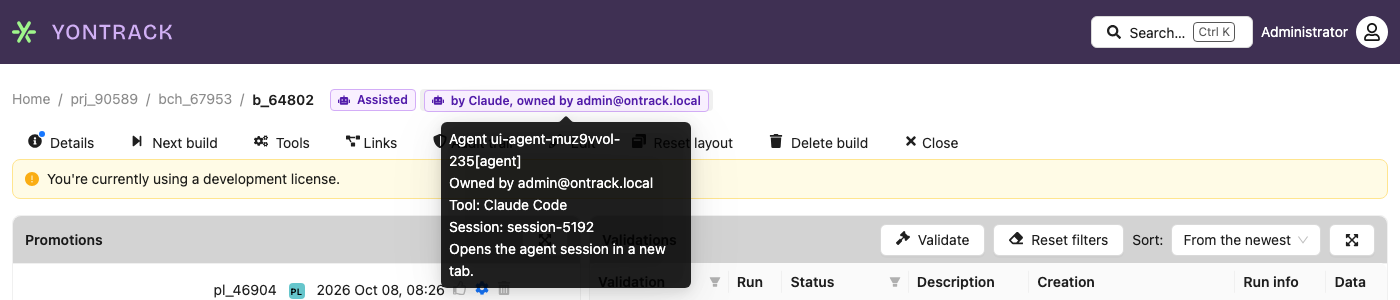
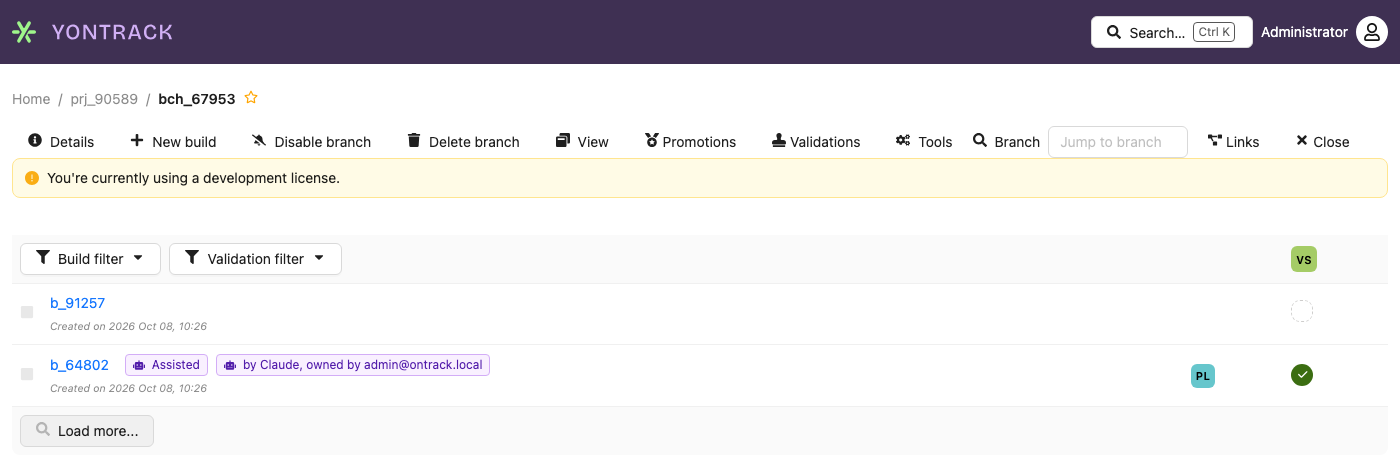
A build also says whether its commits were written with assistants:
- Assisted — its tooltip gives the number of assisted commits, the assistants and the links to their sessions;
- Assisted: unknown — a neutral badge, whose tooltip says why it could not be computed;
- nothing when the build is not assisted, or before it has been computed.
The badges show on:
| Where | Badges |
|---|---|
| The build page, and the rows of the builds on the branch page | Assisted, and the agent which created the build |
| The validation run page and its statuses, the validations of a build | The agent behind each status |
| The promotions of a build, the promotion run page, the history of a promotion level | The agent which promoted |
| The deployment page: its timeline, the overrides and the answers to its admission rules | The agent behind each change |
| Accounts and Agents in the administration | The kind of the account, Agent or Person |
| Information › Events | The agent behind each event |
On a phone, the build screen shows the Assisted badge in its header, and the agent which made each of its promotions:
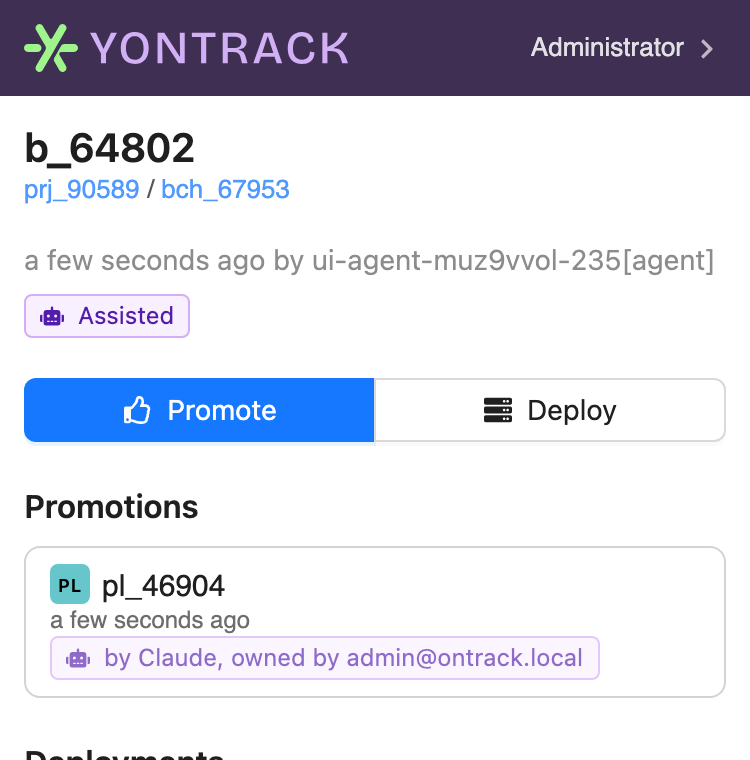
The badges say what they mean in words: their colour and their icon are never the only cue, and a screen reader reads "by agent Claude, owned by alice@example.com" or "Assisted: 3 of 12 commits, by Claude Code".
Following what agents do
The actor of an event can be selected on:
- the keywords of a subscription —
actor:agent,actor:humanandagent:<slug>— so that "notify me when an agent promotes" or "a person marked a deployment as done" are ordinary subscriptions, and the workflows they trigger are filtered the same way; - the Actor filter of the events page — persons, agents, or one agent — which its export follows, with the actor of each event in its columns.
The builds of a branch can be filtered on whether they were assisted and on who created them — persons, agents, or one agent — from the Agents tab of the standard build filter.
The Agents section of a build lists what agents did on that build, the activity of an agent what one agent did across the projects, and the agent activity across the projects what all of them did.
What agents did on a build
The build page has an Agents section, read before promoting a build: what agents had to do with it. It shows only when there is something to show — the commits of the build were assisted, or an agent acted on it — and anyone who can see the build sees it.
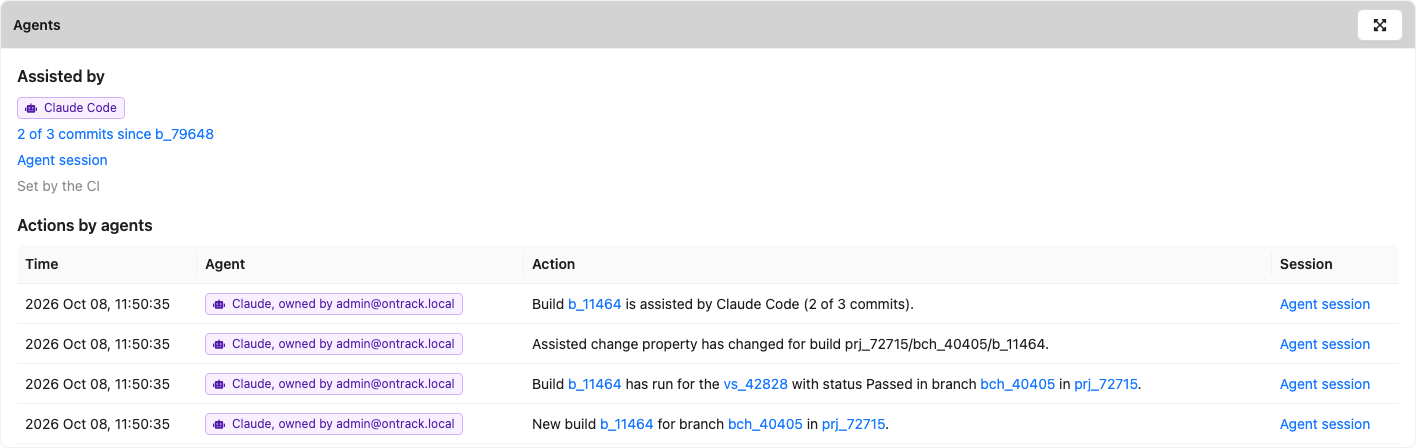
It holds two lists, which are never merged nor linked: an assistant named by a commit is a kind of tool, never a registered agent.
Assisted by, from git — the assisted change of the build:
- the assistants of its commits;
- "N of M commits since previous build", linking to the change log between the two builds;
- the links to the agent sessions behind the commits;
- how this was obtained: computed by Yontrack from the change log, set by the CI, or unknown — with the reason.
Actions by agents, from the event log — the events of the build whose actor is an agent, newest first: its creation, its validations, its promotions, its links, its properties... Each one gives its time, its message, the badge of the agent and a link to its session. Load more reads the older ones. An event which also concerns a project you cannot see — a link from a build of that project, for example — is left out.
The events are the source of these actions: there is no other record of them. With the retention of the events set, the actions older than the retention period disappear from the section with the events. The Assisted by part is a property of the build, and stays.
Through the API, agentActions gives the same page of events on a build, and the assisted change
gives the build it was computed from:
{
  build(id: 123) {
    assistedChange {
      assistants
      assistedCommits
      totalCommits
      previousBuild { id name }
    }
    agentActions(offset: 0, size: 20) {
      pageInfo { nextPage { offset size } }
      pageItems {
        time
        message
        eventType { id }
        actor { agent displayName owner sessionLink }
      }
    }
  }
}
A page holds at most 100 events. There is no total count: pageInfo.nextPage tells whether there
are more.
The mobile UI shows the badges only, not this section.
Agent activity
Licensed feature
The activity of the agents is part of the Agent governance feature (extension.agents) — see
Licensing. Without it, the Activity tab says that the
license is needed, and the API refuses the read.
"What did this agent do in the last 7 days?" The page of an agent — from User information > My agents, or System > Agents for an administrator — has an Activity tab: the actions of the agent, newest first, over the last 7, 30 or 90 days (7 by default), which can be filtered by event type and by project.

Each action gives its time, its message, its project and a link to the agent session behind it. Load more reads the older ones.
- Who — only the owner of the agent and the administrators read its activity. Anybody else is refused, even if they can see the projects the agent acted on.
- What — only the actions on the projects you can see: an action which also concerns a project you cannot see — a link from a build of that project, for example — is left out. The actions on no project at all, like the deletion of a project, are shown to the administrators only.
As for the Agents section of a build, the events are the source of the activity, and the retention of the events applies to it.
Through the API, agentActivity gives a page of the actions of an agent account, for its owner and the
administrators:
query AgentActivity($id: Int!, $from: LocalDateTime) {
  agents(id: $id) {
    agentActivity(from: $from, eventTypes: ["new_validation_run"], project: "my-project", offset: 0, size: 20) {
      pageInfo { nextPage { offset size } }
      pageItems {
        time
        message
        eventType { id }
        project { name }
        actor { agent sessionLink }
      }
    }
  }
}
from and to bound the window, eventTypes and project filter the actions — all optional. A page
holds at most 100 events, and there is no total count: pageInfo.nextPage tells whether there are
more. agentActivity is empty for a person.
Agent administration being desktop only, the mobile UI has no activity view.
Agent activity across the projects
Licensed feature
The views of the agent activity across the projects are part of the Agent governance feature
(extension.agents) — see Licensing. Without it, the
widget and the page say that the license is needed, the Latest agent actions entry is not in
the menu, and the API refuses the reads.
"How much of our delivery do agents drive?" Two views answer it across the projects, for any user, each one restricted to the projects this user can see: an action which also concerns a project you cannot see — a link from a build of that project, for example — is neither listed nor counted.
The agent activity widget
The Agent activity dashboard widget counts, over the last 7, 30 or 90 days (30 by default), across the projects you can see — or only some of them, given by name or by labels:

| Tile | What it counts |
|---|---|
| Builds by agents | The builds created by an agent: the new_build events whose actor is an agent |
| Promotions by agents | The promotions by an agent: the new_promotion_run events whose actor is an agent |
| Deployments by agents | The deployment actions of an agent: the slot pipelines it started, it started to deploy, and it marked as deployed (slot-pipeline-creation, slot-pipeline-deploying and slot-pipeline-deployed events) |
| Assisted share | The share of the builds whose commits were written with assistants - see below |
The assisted share is about the builds created in the window, whoever created them:
- its numerator is the number of builds whose assisted change has at least one assistant;
- its denominator is the number of builds whose assisted change is known — computed by Yontrack from the change log, or set by the CI;
- the builds whose assisted change is unknown — no SCM, no previous build with a commit, an SCM error — are excluded from the share, and counted apart, under the tile ("2 unknown"). So are the builds whose assisted change is not computed yet.
With no known build in the window, the share is "-" rather than 0%.
Each tile opens the latest agent actions below, filtered on the window and on the event types it counts — and on the project, when the widget counts only one. The assisted share opens the builds created by agents.
The counts are computed by the database: no event and no build is read to count it.
Latest agent actions
Information > Latest agent actions lists what the agents did, newest first, on the projects you can see, filtered on a window of 7, 30 or 90 days (7 by default), an agent, event types and a project. Load more reads the older ones.
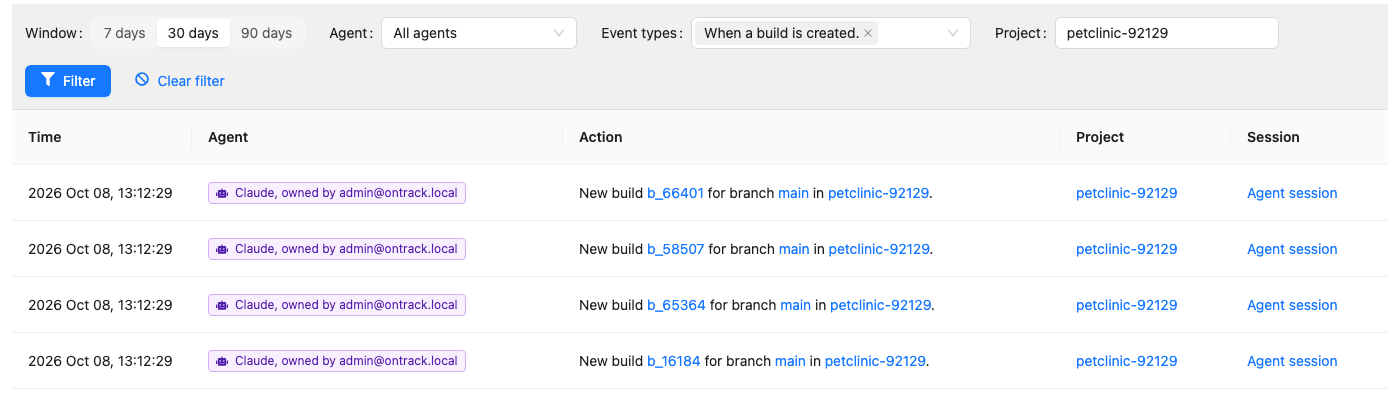
Each action gives its time, the badge of the agent, its message, its project and a link to the agent session behind it. The agent filter offers every agent to an administrator, and their own agents to anybody else. The actions on no project at all, like the deletion of a project, are shown to the administrators only.
As everywhere else, the events are the source of these views, and the retention of the events applies to them.
Through the API, agentActivityStats gives the counts, and agentActions a page of the actions:
{
  agentActivityStats(window: 30, labels: ["team:platform"]) {
    builds
    promotions
    deployments
    assistedBuilds
    knownBuilds
    unknownBuilds
    assistedShare
  }
  agentActions(agent: "claude[agent]", eventTypes: ["new_build"], project: "my-project", offset: 0, size: 20) {
    pageInfo { nextPage { offset size } }
    pageItems {
      time
      message
      eventType { id }
      project { name }
      actor { agent displayName owner sessionLink }
    }
  }
}
assistedShare is between 0 and 1, and null when no build is known. For agentActions, from and
to bound the window, agent, eventTypes and project filter the actions — all optional. A page
holds at most 100 events, and there is no total count: pageInfo.nextPage tells whether there are
more.
The mobile UI has neither dashboards nor the Information menu: a link to the latest agent actions opens the "desktop only" screen on a phone.
What an agent may do
An agent's rights are its owner's rights, narrowed by the agent policy. Nothing is assigned to the agent itself — a role granted to an agent is ignored — so demoting or deleting the owner bounds the agent at once, with nothing to keep in sync. The owner's rights are all of them: roles, groups, groups mapped from the identity provider, and project permissions.
| Action | Default |
|---|---|
| Read everything its owner can | yes |
| Create builds, validation runs, build links and build properties (record evidence) | yes, unless the validation stamp takes evidence from non-agents only |
| Promote | no, unless the promotion level admits agents |
| Start or finish a deployment | no, unless the slot admits agents |
| Satisfy a manual admission rule | never |
| Change configuration (projects, branches, promotion levels, validation stamps, slots, subscriptions, CasC, settings, accounts) | no |
| Delete builds or promotions, override admission rules, cancel deployments | no |
Evidence is cheap to record and safe to audit; gates are where accountability lives.
The policy is an allowlist: every function which is not listed in it is denied to agents, including the functions which extensions add later.
| Function | Granted when |
|---|---|
ProjectList, ProjectView, EnvironmentList, SlotView, ProjectFindingsView, ProjectSubscriptionsRead, SCM catalog access |
the owner holds it |
BuildCreate, BuildConfig |
the owner holds it |
ValidationRunCreate, ValidationRunStatusChange, ValidationRunStatusCommentEditOwn |
the owner holds it |
PromotionRunCreate |
the owner holds it, on a promotion level which admits agents |
SlotPipelineCreate, SlotPipelineStart, SlotPipelineFinish, SlotPipelineData, SlotPipelineWorkflowRun |
the owner holds it, in a slot which admits agents |
Never granted, whatever the owner may do: SlotPipelineOverride, SlotPipelineCancel,
SlotPipelineDelete, the creation, edition and deletion of projects, branches, promotion levels,
validation stamps and slots, ProjectConfig, the subscriptions, the CasC, AccountManagement,
ApplicationManagement, EventsAudit, BuildEdit, BuildDelete and PromotionRunDelete.
A refusal by the agent policy always says why, in the GraphQL error or in the body of the HTTP 403:
agent claude-code-ci[agent] may not ProjectEdit (agent policy)
Agent asks, human approves
An agent never approves a deployment: in a slot which admits agents, it starts the pipeline, and its approval of a manual admission rule is refused with "an agent cannot approve; ask owner" — even when the rule lists the agent. The pipeline stays a candidate until a person approves it. Promotions stay a person's decision, unless the promotion level admits agents.
Auto-promotion
Auto-promotion is not concerned by the agent policy. When an agent records the validations which complete the requirements of a promotion level, Yontrack itself grants the promotion on the agent's behalf, whether the level admits agents or not: the auto-promotion rules of the level are the gate.
Reading your own policy
An agent should know which gates it may pass before acting, rather than by being refused and
retrying. It reads its own policy on a project through the user query, authenticated with its
token:
query AgentPolicy($project: String!, $branch: String) {
  user {
    account { kind owner { fullName email } }
    agentPolicy(project: $project) {
      owner
      canRecordEvidence
      promotionLevels(branch: $branch) { id branch name }
      slots { id environment qualifier manualApproval }
    }
  }
}
account.kindisAGENT, andaccount.ownernames the person accountable for the agent;agentPolicyisnullfor a person. For an agent, it gives:owner— the full name of the owner, the person to ask when the policy stops the agent;canRecordEvidence— whether the agent may create builds and validation runs on the project;promotionLevels— the promotion levels of the enabled branches of the project which admit agents, provided the owner may promote on the project: empty otherwise. The optionalbranchargument restricts them to one branch;slots— the slots of the project which admit agents, provided the owner may start a deployment pipeline in them.manualApprovalistruewhen a manual admission rule will still stop the agent: it may start the pipeline, but a person approves it.
An unknown project, or one the owner cannot see, is an error. This is the query the Yontrack conduct skill for agents runs before it acts on a project.
The readiness of a build tells the agent the same thing for
one target: when the agent reads it for a promotion level or a slot which does not admit agents, an
AGENT_POLICY item says so — "agents are not admitted on GOLD; ask owner" — alongside everything
else which is missing, so that one call tells the agent all that stands in its way.
A CI pipeline is not an agent
A CI pipeline acting through an account holding the AUTOMATION role is automation, not an
agent: it runs a script that a person wrote and reviewed, and its account stays as it is. Nothing
converts it into an agent.
An agent is a non-human principal that decides what to do by itself — typically an AI coding agent working on a person's behalf. Register one when the record must be able to say "this was done by an agent, owned by this person".
Assisted builds
A build is assisted when the commits of its change — since the previous build of its branch —
were written with coding agents. The kinds of agents are the
assistants of the commits, recognised from
their trailers (Co-Authored-By, Assisted-by, Claude-Session), their authors and the
Agent markers settings. They are not the
registered agents above: assisted by comes from git, actions by from the record.
The fact is a property of the build, Assisted change, rather than a validation: being assisted is neither a success nor a failure.
| Field | Meaning |
|---|---|
basis |
How the value was obtained: COMPUTED, SET_BY_CI or UNKNOWN |
unknownReason |
Why the value is unknown, when the basis is UNKNOWN |
assistants |
Names of the assistants, distinct and sorted. The build is assisted when there is at least one |
assistedCommits |
Number of commits written with an assistant |
totalCommits |
Number of commits in the change of the build |
sessionLinks |
Links to the agent sessions behind the commits, at most 20 |
previousBuildId |
ID of the build the change log was computed from |
How Yontrack computes it
When the commit of a build is set — when the build is created, or just after — Yontrack computes the change log from the previous build of the branch which has a commit, and counts the assistants of its commits. This runs in the background, after the build is saved: setting the commit never waits on the SCM. With several replicas of Yontrack, any of them computes it, one computation at a time per build.
- A value set by the CI is never recomputed.
- A build without a commit gets nothing yet: the computation runs when the commit is set.
- When the commit of a build is removed, its computed value is removed too — the build is back to not computed. A value set by the CI is kept.
- The value is
UNKNOWNwhen the computation cannot run, with its reason:no SCM— the project has no SCM able to compute change logs;no previous build with a commit— typically, the first build of a branch;SCM error: …— the SCM failed. It is computed again the next time the commit of the build is set.
- Computing the value again gives the same value, and changes nothing.
A build without the property has not been computed yet: like UNKNOWN, it is neither assisted nor
not assisted.
Setting it from the CI
When Yontrack has no SCM for the project, the CI sets the property itself, with the SET_BY_CI
basis — which is the default of the mutation:
mutation {
  setBuildAssistedChangeProperty(input: {
    project: "my-project",
    branch: "main",
    build: "42",
    assistants: ["Claude Code"],
    assistedCommits: 3,
    totalCommits: 5,
    sessionLinks: ["https://claude.ai/code/session_0123"],
  }) {
    errors { message }
  }
}
The generic property mutations (setBuildPropertyById with the
net.nemerosa.ontrack.extension.scm.changelog.assistants.AssistedChangePropertyType type) accept the
same fields as JSON.
The number of assisted commits cannot exceed the total number of commits, and an UNKNOWN value
cannot have assistants.
The value is available in GraphQL as Build.assistedChange, null when it has been neither computed
nor set:
{
  build(id: 42) {
    assistedChange {
      assisted
      basis
      unknownReason
      assistants
      assistedCommits
      totalCommits
      sessionLinks
    }
  }
}
The build_assisted event
The first time the property of a build is written with at least one assistant, whether Yontrack
computed it or the CI set it, the build_assisted event is posted:
Build 42 is assisted by Claude Code, Codex (2 of 5 commits).
Its values are assistants, assistedCommits, totalCommits and sessionLinks, the lists being
separated by a comma and a space. It is posted once for a build: there is no clearing event, and
a later value which disagrees posts nothing — a recomputation that disagrees is a configuration
problem, not a change of the build. Like any event, notifications can subscribe to it.
Requiring validations of assisted builds
A promotion level can require validations of assisted builds only — a human review, a security
scan — with its Assisted builds require
property. It fails closed: a build whose assisted change is not computed yet, or is UNKNOWN,
counts as assisted. This ruling is under license, as the Agent governance feature
(extension.agents) — see Licensing.
Templating
The builds expose their assisted change to templates:
${build.assisted}—true,false, orunknownwhen the value has not been computed or could not be;${build.assistants}— the names of the assistants, separated by a comma and a space; empty when there is none.