Security findings
Yontrack records the findings of the security scans run by your pipelines — image scans, code analysis, secret detection, DAST — and follows each of them over time, on every branch: when it appeared, where it is still exposed, when it was fixed.
A scan is sent as the report of a validation: the validation run gets its status from the counts by severity, as a CHML run would, and the findings themselves are kept.
Note
The findings, their pages, their events and the neutral format are available to everyone. Only the reading of native scanner formats — SARIF and Trivy JSON — is under license. See License.
The model
- Finding
- One known weakness — a vulnerability, a code issue, a secret, a DAST alert — at one location of one project. A finding is identified by its scanner, its external ID (a CVE, a rule ID…) and its location (a package, a file, a URL…). The same CVE in two packages makes two findings.
- Observation
- One sighting of a finding by one scan of one build. The observation carries what the scan saw at that time: the severity, the installed and fixed versions, the acceptance.
- Exposure
- A finding is exposed on a branch while the latest scan of the same validation stamp on that branch reports it.
- Acceptance
- A decision, recorded outside Yontrack and read by it, that a finding is tolerated, possibly until an expiry date.
- Resolution
- A finding exposed on a branch is resolved there when the latest scan of the same validation
stamp on that branch no longer reports it. The reason of the resolution is recorded as
ABSENT.
The kind of a finding says what was scanned: IMAGE, CODE, SECRETS, DAST,
DEPENDENCIES or OTHER.
Its severity is one of CRITICAL, HIGH, MEDIUM, LOW or UNKNOWN, the severity the
scanner used being kept beside it as the raw severity.
Exposure on a branch
Exposure is followed per branch and per validation stamp: a scan only speaks for its own stamp on
its own branch. A scan of SECURITY.IMAGE on main never resolves what SECURITY.CODE reported,
nor what SECURITY.IMAGE reported on release/1.0.
On a branch, a finding is in one of three states:
| State | Meaning |
|---|---|
EXPOSED |
The latest scan reports it, without acceptance |
ACCEPTED |
The latest scan reports it, with an acceptance which has not expired |
RESOLVED |
The latest scan no longer reports it |
When the finding comes back on a branch where it was resolved, it is exposed again, and flagged as reopened.
Exposure periods
The exposure of a finding on a branch, for a stamp, is made of one or more periods: each runs from the first scan which reported the finding to the first scan which no longer did. A reopening starts a new period; the earlier ones are kept.
Each end of a period records its validation run and the display name of its build — the release label when there is one — so that the page of a finding says not only when it was discovered and fixed, but in which build. When the builds are purged, their runs go with them, but the names of the builds stay.
The duration of a period runs until it ends, or until now while it is open. An accepted stretch counts as exposed: the vulnerable code still ships, and an acceptance is a decision about the risk, not a fix. Durations are given in minutes under an hour, in hours under 48 hours, and in days above.
Exposure episodes
Across branches and stamps, the periods of a finding make up its exposure episodes: an episode is the union of its periods on a set of branches, periods which overlap or touch — one ends at the instant the next one starts — merging, with no gap tolerance. A reopening starts a new episode; the time the finding stayed resolved belongs to no episode. As for the periods, an accepted stretch counts as exposed.
The Exposed for column of the findings page and the remediation readings of the scorecard measure episodes.
Note
The expiry of an acceptance is evaluated when the finding is read, not by a background job. An acceptance past its expiry stops counting from that day on, and the finding is shown as exposed. The new finding event fires at the next scan reporting the finding without a valid acceptance.
Project roll-up
At the level of the project, a finding is:
OPENwhen it is exposed on at least one branchACCEPTEDwhen it is not open, but accepted on at least one branchRESOLVEDotherwise
Only some branches count for this roll-up:
- a disabled branch keeps its exposure, visible on the finding page, but is left out of the state of the project. Enabling it again brings it back.
- when the project has a branching model, only the branches matching it count.
- a deleted branch takes its exposure with it. Nothing was fixed, so no resolution event is sent.
Versions and locations
For a package, the location is its package URL
without its version and its qualifiers: pkg:maven/org.yaml/snakeyaml, not
pkg:maven/org.yaml/snakeyaml@1.33?type=jar. The installed version is recorded on the observation.
This way, bumping a package to a version which is still vulnerable keeps the same finding open: a finding is resolved when it is fixed, not when its package is bumped.
Yontrack strips the version and the qualifiers itself, in every format: a report giving a versioned package URL as location is accepted, and the version is then used as the installed version if none is given.
The validation stamp type
The findings of a scan are sent to a validation stamp whose type is Security findings. In the
CI configuration, its alias is security-findings, and its
configuration is the one of the CHML type:
version: v1
configuration:
  defaults:
    branch:
      validations:
        SECURITY.IMAGE:
          security-findings:
            warningLevel: HIGH
            warningValue: 1
            failedLevel: CRITICAL
            failedValue: 1
The status of the run is computed from the number of findings the scan reports at each severity:
FAILEDwhen the number of findings of severityfailedLevelis at leastfailedValue- else,
WARNINGwhen the number of findings of severitywarningLevelis at leastwarningValue - else,
PASSED
A value of 0 disables its threshold.
As for CHML, the stamp can also let a warning through to the
auto promotion, with warningPassesAutoPromotion — optional,
false by default:
        SECURITY.IMAGE:
          security-findings:
            warningLevel: HIGH
            warningValue: 1
            failedLevel: CRITICAL
            failedValue: 1
            warningPassesAutoPromotion: true
A run whose last status is WARNING then counts as passed for the auto promotion, and only for it: it
still shows as a warning everywhere else. A warning later moved to another status, EXPLAINED for
example, does not count.
Warning
As for CHML, a threshold counts the findings of exactly its severity, not of this severity
and above. With failedLevel: HIGH, a report with only CRITICAL findings does not fail.
Set the failure on CRITICAL and the warning on HIGH, as above, to be warned from the first
HIGH and to fail from the first CRITICAL.
The counts ignore two kinds of findings:
- the accepted findings, which are counted apart, as accepted
- the findings of
UNKNOWNseverity, which are counted and displayed, but never trip a threshold
A stamp switched from the CHML type to the Security findings type keeps the history of its chart: both store their counts the same way. A stamp switched from another type, such as a number of findings, has no counts by severity to carry over, and its chart starts again.
Note
The findings only come with a report, as described below. A run created from the validation dialog of the UI carries no findings, and its status is the one chosen in the dialog.
Sending a report
A report is sent with the validateBuildWithFindings GraphQL mutation, usually through the
CLI. It is read, and its findings stored, in one go: when the mutation returns, the
validation run, its findings and their exposure are all written, and the events have
been sent. A report which cannot be read creates no validation run and fails the call, and with
it the step of your pipeline.
Three formats are accepted:
| Format | What | License required |
|---|---|---|
findings |
The neutral format of Yontrack | No |
sarif |
SARIF 2.1 | Yes |
trivy |
Trivy JSON, vulnerabilities only | Yes |
The CLI
The Yontrack CLI, from version 5.8.0, sends a report
with yontrack validate … findings:
yontrack validate --project <project> --branch <branch> --build <build> --validation <validation> \
    findings \
        --format trivy \
        --kind IMAGE \
        --report trivy.json
--format(required) -findings,sarifortrivy--kind(required) - what was scanned:IMAGE,CODE,SECRETS,DAST,DEPENDENCIESorOTHER--scanner- name of the scanner, overriding the one Yontrack reads from the report--report(required) - path to the report, a JSON file
The CLI does not read the report: it sends it as it is, and Yontrack parses it. The other options
of yontrack validate — the description, the run info — apply as for any validation. In a pipeline
configured as described in Feeding Yontrack, --project, --branch
and --build can be left out.
GraphQL
The mutation takes the same information:
mutation ($report: JSON!) {
  validateBuildWithFindings(input: {
    project: "my-project"
    branch: "main"
    build: "42"
    validation: "SECURITY.IMAGE"
    format: "trivy"
    kind: IMAGE
    report: $report
  }) {
    validationRun { id runOrder }
    errors { message }
  }
}
where the report variable is the content of the report, as JSON — not as a string.
scannerandkindare optional here, and override those given by the report. The SARIF and Trivy formats cannot give the kind, which must then be passed.description,runInfoanddateTime(the time of the scan, now by default) are optional.- the caller needs to be allowed to validate builds of the project.
A report which cannot be read, or needs a license the instance does not have, comes back in
errors, listing up to 20 of its problems by field — never by value.
Neutral format
The findings format is Yontrack's own. It is the one to use when writing a converter for a scanner
Yontrack does not read natively — or for anything else, such as the alerts of a code hosting
service.
{
  "scanner": "zap",
  "kind": "DAST",
  "findings": [
    {
      "externalId": "10038",
      "location": "",
      "severity": "MEDIUM",
      "rawSeverity": "Medium",
      "title": "Content Security Policy (CSP) Header Not Set",
      "url": "https://www.zaproxy.org/docs/alerts/10038/",
      "fixedVersion": null,
      "installedVersion": null,
      "acceptance": {
        "statement": "Served behind a proxy setting the header",
        "expiresAt": "2026-12-31",
        "source": "security/dast/suppressions.yaml"
      }
    }
  ]
}
| Field | Required | Description |
|---|---|---|
scanner |
(1) | Name of the scanner |
kind |
(1) | IMAGE, CODE, SECRETS, DAST, DEPENDENCIES or OTHER |
findings |
Yes | List of findings, possibly empty |
findings[].externalId |
Yes | ID given by the scanner: a CVE, a rule ID… |
findings[].location |
Yes | Where the finding is, possibly empty. See the conventions below |
findings[].severity |
Yes | CRITICAL, HIGH, MEDIUM, LOW or UNKNOWN |
findings[].title |
Yes | Short description |
findings[].rawSeverity |
No | Severity as given by the scanner |
findings[].url |
No | Link to the description of the finding |
findings[].installedVersion |
No | Version of the package found by the scan |
findings[].fixedVersion |
No | Version of the package fixing the finding |
findings[].acceptance |
No | The finding is accepted |
findings[].acceptance.statement |
Yes | Why the finding is accepted, possibly empty |
findings[].acceptance.source |
Yes | Where the acceptance is recorded, for example a file of your repository |
findings[].acceptance.expiresAt |
No | Date the acceptance expires, as yyyy-MM-dd |
(1) Required either in the report or as an argument of the call. The argument wins. The CLI always
passes --kind, which is mandatory there, and passes --scanner when given.
The values of kind and severity are case-sensitive, and unknown fields are rejected: the
format has no place for a secret value, and a converter cannot add one by mistake.
The JSON schema of this format, with the key findings, can be downloaded from the Resources page
of the user menu — see JSON schemas.
Location conventions
The location is part of the identity of a finding: a scan reporting another location for the same issue makes another finding. For a converter to produce stable findings, follow these conventions:
| Kind of finding | Location | Example |
|---|---|---|
| A dependency, a package | Its package URL, without version nor qualifiers | pkg:npm/lodash |
| A code issue | The path of the file, without line nor column | src/main/java/App.java |
| A DAST rule | Empty: the rule is the finding | "" |
| A secret | The number of the alert in the provider, never the value | 42 |
Several entries with the same external ID and location in one report are merged into one finding, keeping an unaccepted entry before an accepted one, then the most severe one.
SARIF 2.1
sarif reads the SARIF 2.1
format, written by CodeQL, Semgrep, Trivy and many others.
The kind must be given with the call: a SARIF file cannot say whether it comes from the scan of an
image, of a file system or of dependencies. It applies to all the runs of the file.
| Finding | Read from |
|---|---|
| scanner | runs[].tool.driver.name, lowercased — CodeQL gives codeql. Required as argument when the file has no run, a run has no name, or the runs have different names |
| external ID | result.ruleId, else the ID of its rule |
| location | The artifactLocation.uri of the first location of the result, without its region: no line, no column. Empty when there is none |
| title | shortDescription of the rule, else its name, else its ID |
| URL | helpUri of the rule |
| severity | See below |
| acceptance | See below |
Because the location has no line, several results of one rule in one file make one finding: moving code around does not open new findings.
Results whose kind is pass or notApplicable, and results whose baselineState is absent,
are skipped.
Note
Yontrack never reads the message of a result, nor the snippet or contextRegion of its
locations. That is where a secret scanner puts the secret.
SARIF severity
The severity follows what GitHub code scanning shows:
-
a
security-severityscore in thepropertiesof the result, else of its rule:Score Severity 9.0 and more CRITICAL7.0 to 8.9 HIGH4.0 to 6.9 MEDIUMabove 0 LOW -
else, the
levelof the result, else the default level of its rule:Level Severity errorHIGHwarningMEDIUMnoteLOWnone, or absentUNKNOWN
The raw severity records what was read: security-severity=7.5 or level=error.
SARIF acceptance
A result is accepted when one of its suppressions has the status accepted, or no status, and
none of them is underReview or rejected.
- the statement is the
justificationof the suppression - the source is the file of the suppression when it has a location, else
SARIF suppression (<kind>), for exampleSARIF suppression (inSource) - there is no expiry: SARIF has no field for it
Trivy JSON
trivy reads the JSON report of Trivy (--format json, schema version 2).
Only the vulnerabilities are read (Results[].Vulnerabilities[]). The secrets, the
misconfigurations and the licenses are ignored — Trivy's secret results carry the matched text.
The kind must be given with the call, since the same report is written for an image, a file system
or a repository. The scanner is trivy, unless given with the call.
| Finding | Read from |
|---|---|
| external ID | VulnerabilityID |
| location | PkgIdentifier.PURL, without version nor qualifiers. When there is no package URL, PkgName — which is not a package URL |
| installed version | InstalledVersion |
| fixed version | FixedVersion |
| severity | Severity, whose values are Yontrack's — including UNKNOWN |
| raw severity | Severity (SeveritySource), for example HIGH (nvd) |
| title | Title, else the external ID |
| URL | PrimaryURL |
Acceptance is read from the ExperimentalModifiedFindings of a result — which Trivy writes only
when run with --show-suppressed — for the vulnerabilities whose Status is ignored (from an
ignore file) or not_affected (from a VEX document):
- the statement is the
Statementof the modified finding - the source is its
Source, for example.trivyignore.yaml - there is no expiry: Trivy does not report it. Trivy itself stops honouring an expired entry, and the finding then comes back as exposed at the next scan.
Why Trivy JSON rather than Trivy's SARIF
Trivy's SARIF output gives as location the path of the package or the scanned target, never the package URL, and the CVE as rule. One CVE in two packages of the same image would then collapse into one finding, and the installed version would be lost. Trivy JSON keeps them apart.
Acceptance
Yontrack does not decide which findings are acceptable: the decision stays with the files your
scanners read — a .trivyignore.yaml, a VEX document, a SARIF suppression, the dismissals of your
code hosting service — and Yontrack reads it from the report.
An accepted finding:
- is counted apart, as accepted, and never trips a threshold of its validation stamp
- is shown with its statement, its source and its expiry
- fires no event when it is first seen already accepted
- is shown as exposed once its acceptance has expired, and counts again in the thresholds from the next scan
License
The reading of native scanner formats — SARIF and Trivy JSON, and any native format to come — is
under license, as the feature extension.findings.native-formats ("Native scanner formats").
Without it:
- a report in the
sarifortrivyformat is rejected, naming the feature, and no validation run is created: the step of your pipeline fails - everything else keeps working: the neutral
findingsformat, the findings pages, the search, the events, the GraphQL API
A license which lapses stops the new native reports only. The findings already stored stay readable, and keep being resolved by scans sent in the neutral format.
Worked examples
Trivy image scan
Scan the image into a JSON report, including the accepted vulnerabilities:
trivy image \
    --format json \
    --output trivy.json \
    --show-suppressed \
    --ignorefile .trivyignore.yaml \
    my-registry/my-app:1.2.3
To accept a vulnerability, record it in an ignore file, passed to the scan with
--ignorefile .trivyignore.yaml:
vulnerabilities:
  - id: CVE-2022-1471
    statement: SnakeYAML is only used to read our own configuration files
    expired_at: 2026-12-31
Then send the report:
yontrack validate --validation SECURITY.IMAGE \
    findings \
        --format trivy \
        --kind IMAGE \
        --report trivy.json
The SECURITY.IMAGE run is then FAILED if the image has a CRITICAL vulnerability, WARNING if
it has a HIGH one, with the thresholds of the configuration above.
CVE-2022-1471 is counted as accepted until the end of 2026 — after which Trivy stops ignoring
it, and the next scan reports it as exposed.
Tip
Without --show-suppressed, the accepted vulnerabilities are simply not in the report, and
Yontrack sees them as absent: they are resolved rather than accepted.
CodeQL
In a GitHub workflow, let CodeQL write its SARIF files to a directory, and send the one of each language:
- name: CodeQL analysis
  uses: github/codeql-action/analyze@v4
  with:
    output: codeql-results

- name: Findings
  run: |
    yontrack validate --validation SECURITY.CODE \
      findings \
        --format sarif \
        --kind CODE \
        --report codeql-results/java.sarif
CodeQL's security queries give a security-severity to their rules, so the severities are the ones
GitHub code scanning shows. The scanner is codeql, the external ID the ID of the query, such as
java/sql-injection, and the location the file.
Note
The alerts dismissed in GitHub code scanning are not in the SARIF file: CodeQL does not know about them. Sent as SARIF, they come back as exposed. When the dismissals must count, read the open and dismissed alerts from the code scanning API instead, and send them in the neutral format, a dismissal becoming an acceptance.
Reading the findings
Seeing the findings of a project requires the ProjectFindingsView function on this project, on top
of seeing the project itself.
By default, every built-in role which can see a project can see its findings. The function is kept apart so that it can be withheld from a role — for example, when the DAST findings of a live deployment are sensitive.
In the UI:
-
the Security section of the project page shows the open findings by severity, the number of accepted and resolved ones, and the branches with open findings. Each figure opens the findings page, filtered.

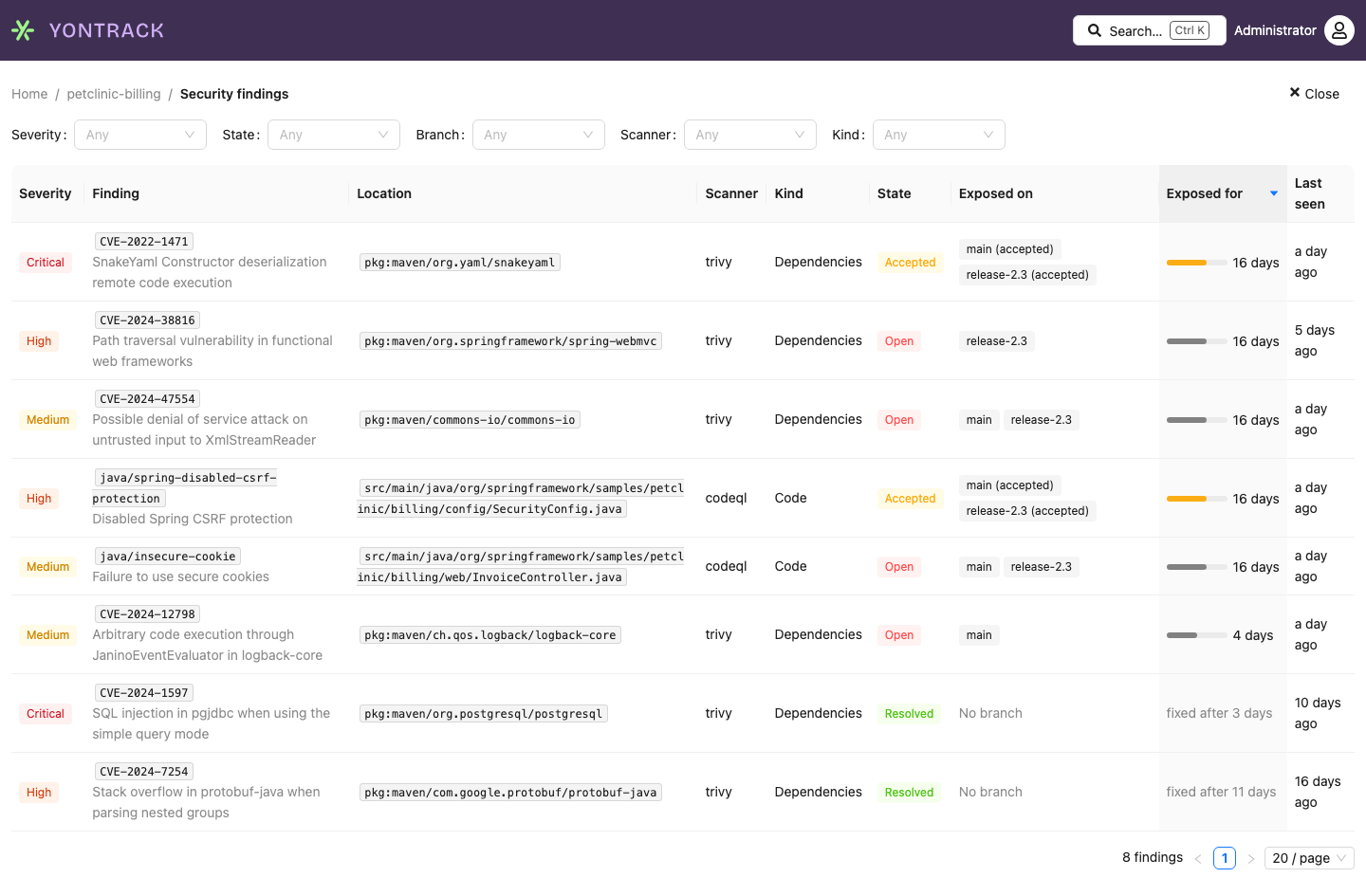
-
the findings page of the project lists them, filtered by severity, state (open, accepted, resolved), branch, scanner and kind. Its Exposed for column says how long each finding has been exposed:
- for a finding still exposed, the duration of its longest ongoing period on one branch for one stamp — the figure the finding page gives per row — over the branches which count for the project, or over the filtered branch only. An age bar comes before it, on a log scale from an hour to a year, so that the bars of every page compare; it is amber when that exposure is accepted. Hovering it gives the branch, the stamp, the start, and whether it is accepted or reopened;
- for a fixed finding,
fixed after X, X being the length of its last exposure episode — what it contributed to the remediation time.
Clicking the header of the column sorts the findings by it, the longest exposed first, across all the pages, and goes back to the first page; findings exposed for as long keep the default order. The findings without any ongoing period — the fixed ones, or the ones not exposed on the filtered branch any more — come last, in the default order. The sort goes in the URL, with the filter, and clicking the header again goes back to the default order: the most severe first, then the most recently seen.
-
the finding page shows a finding, where and when it was first seen — branch and build — its acceptance with statement and expiry, and the link to its description, then:
- its exposure timeline: one lane per branch and stamp, a bar per period, red while exposed, amber while accepted, ending on a green dot when fixed, with the builds at its ends;
- its exposure per branch: for the current period of each branch and stamp, the build it was discovered in, the build it was fixed in, and how long it has been exposed, with the earlier periods of a reopened finding. Its header links to the remediation time of the project on its scorecard;
- its history, the most recent first: its discovery, its exposure on other branches, its fixes and reopenings with their builds, the changes of its acceptance — accepted, withdrawn, expired — and, between them, its observations, grouped, which expand into the scans.
Below, a vulnerability fixed on
mainand still exposed onrelease-2.3: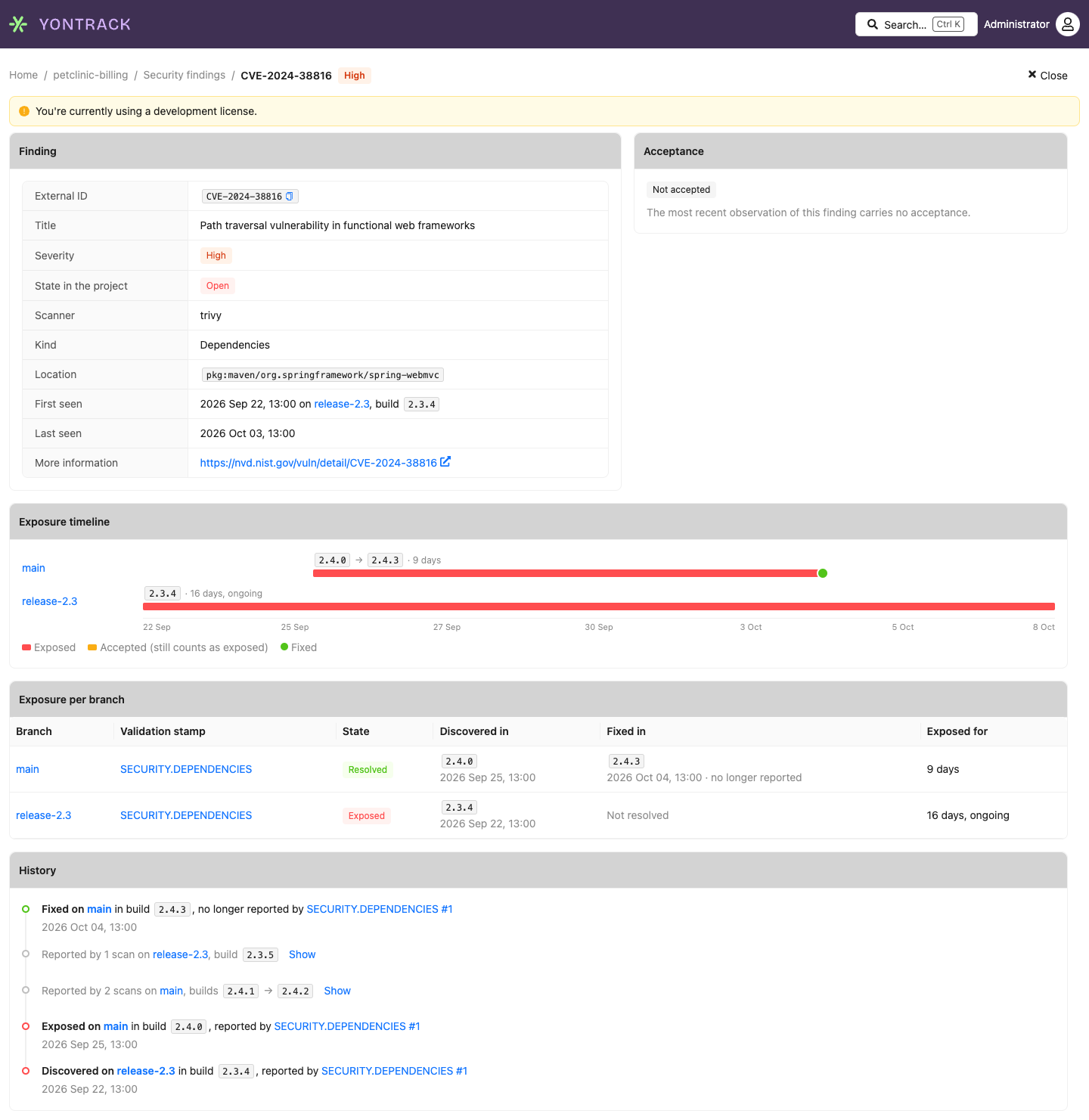
-
the Findings command of a branch page leads to the findings open on this branch. Its badge gives their number, in the colour of the most severe one, and hovering it spells them out —
3 open findings: 1 critical, 2 high. The command appears once a finding has been reported on the branch; with nothing open, it carries no badge.
-
the page of a validation run lists the findings of this scan.
- the search finds a finding by its external ID: searching
CVE-2021-44228lists the projects and branches where it is exposed or accepted, and leads to the finding page. - the findings fan-out of an estate lists the projects of the estate reporting an external ID, with the state of the finding in each and the branches exposing it.
- the security readings of the delivery scorecard
read the scans and findings of a project: its security maturity, how long its
CRITICALandHIGHfindings stay open, and how many are open past the targets of its estates.
Everywhere a number of findings is given by severity, it is a tag in the colour of the severity —
red for critical, orange for high, gold for medium, blue for low, grey for unknown — which names the
severity as well: Critical 3, or C 3 where space is short. A severity without any finding is
shown muted.
Dashboard widgets
Two dashboard widgets show the findings on the home page — see their reference for their keys and configuration:
| Widget | Configuration | Shows |
|---|---|---|
| Project findings | A project, and whether to show its branches | The open findings of the project by severity, the accepted and resolved ones and, optionally, the branches with open findings among those which count for the project |
| Branch findings | A branch | The findings open on the branch by severity, and the ones accepted and resolved on it. A disabled branch, which does not count for the project, still shows its own findings |

Each figure opens the findings page, filtered. A widget tells a user who cannot see the findings of the project so, rather than showing zeros, and says when no finding has been reported at all.
Note
The mobile UI does not show findings, nor dashboards.
Through the GraphQL API:
Project.findings(filter, sort)lists the findings of a project, paginated, most severe first, with the same filters as the findings page;sort: EXPOSED_FORsorts them the longest exposed firstFinding.exposedFor(branch)says how long a finding has been exposed: its longest ongoing period, with its branch, stamp, start, and whether it is accepted or reopened, and the length of its last exposure episode — over the branches which count for the project, or over the given branchProject.findingsSummarygives the counts the Security section showsBranch.findingsSummarygives the counts of one branch: its open findings by severity, the number of its accepted and resolved ones, and whether a finding has ever been reported on itValidationRun.findingslists the observations of a scanFinding.firstSeenInandFinding.resolvedIngive where and when a finding was first seen, and resolved in its project: branch, stamp, run and buildFindingExposure.periodslists the periods of an exposure, with their builds, their duration and their accepted stretchesFinding.historylists the history of a finding, paginated, andFinding.observationstakes a branch, a stamp and a time range to expand a group of itfindings(externalId)lists the findings with this external ID, across all the projects you can see the findings offinding(id)gets one finding
Events
Two events follow the exposure of findings on branches:
security_finding_new- a finding becomes exposed on a branch where it was not. When it was there before — resolved, or accepted — itsREOPENEDfield istrue.security_finding_resolved- a finding exposed on a branch is no longer reported by the latest scan of its validation stamp there.
The events speak for the branch, all its validation stamps together: a finding reported by two stamps of a branch is new when the first one reports it, and resolved when neither does any more.
Their entity is the branch. A subscription on the main branch
answers "tell me of any new finding on main", and one on the project sees all its branches.
The keywords of a subscription are matched against the values of the event, so they can narrow it
down: critical keeps the CRITICAL findings only, codeql the findings of CodeQL. All the
keywords of a subscription must match, so one subscription follows one severity.
There is no event per observation: scanning a build which reports the same findings as the previous one sends nothing.
Metrics
The time taken to read and store a report, and its number of findings, are published as metrics, tagged by format.