Yontrack model
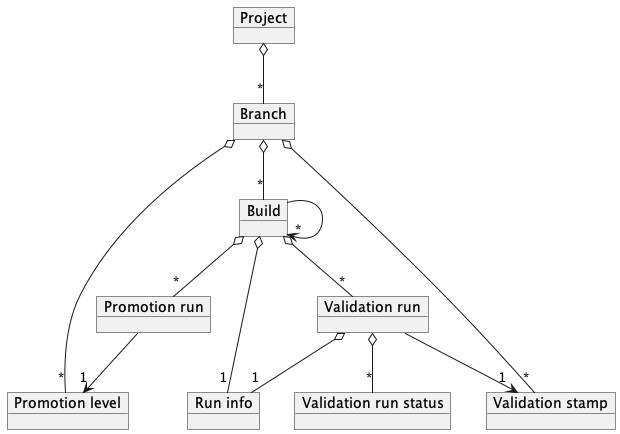
At the core, Yontrack collects information using an information model composed of the following entities:
Branches are configured with a list of validation stamps and promotions levels that builds can be associated with validation runs and promotions.
Finally, each entity in Yontrack can be associated with properties, which enrich the model with additional information.
Projects
Projects are at the root of the model hierarchy of Yontrack. They can be linked to each other (typically by links between builds).
In most cases, a project is linked to a SCM repository. But there are situations where creating a project independently of a repository is useful.
Projects can be tagged with labels, to organise them across the hierarchy and to filter the project lists.
Branches
One project can have several branches. They are usually linked to an actual SCM branch.
Builds
One build represents ... one build in a given branch. These builds are typically linked to an actual build (or workflow run, or pipeline execution, etc.) in a CI system. Depending on your setup, relaunching a build in your CI can lead to a unique or several builds in Yontrack.
A build would be associated with a commit in the SCM repository.
Links between builds are used to define the dependency between builds, across branches, across projects.
Validation stamps
When a build is being built by the CI engine, it is tested, scanned, probed, deployed, etc. This can happen in the same pipeline (or workflow run, etc.) or in several pipelines, which can be run asynchronously, nightly, etc.
These pipelines represent different quality probes on a given build. We call them validation stamps in Yontrack, because they are like actual stamps we would put on a given package, the build.
The validation stamps can be typed but not necessarily. For example, we can wish to represent a validation as a test summary, with the number of failed tests, skipped tests, passed tests, etc.
Promotion levels
While validation stamps are linked to a specific kind of check, test, scan result, etc., promotion levels are used to talk more generally about the quality of a given build.
They can typically group several validation stamps together, rely on other promotion levels. They can also be granted independently.
Promotion level names can be anything, but you have to agree at your organization level on their meanings. They will often be used to talk about quality throughout all your projects. Something often used is to use abstract names, like medal names, like gold, silver, bronze, etc. But again, this is up to you.
Promotion levels can have configurable fields that users must fill in when promoting a build.
Validation runs
When linked to a build, a validation stamp can be passed, failed, in warning, etc. It has a complete lifecycle linked to a given build.
This is called a validation run. In some cases, a validation will be run several times for a given validation stamp and build: several validation runs can be associated with a given validation stamp and build.
If the associated validation stamp is typed, the validation run will need to also contain some data, of the same type as the validation stamp.
Validation life-cycle
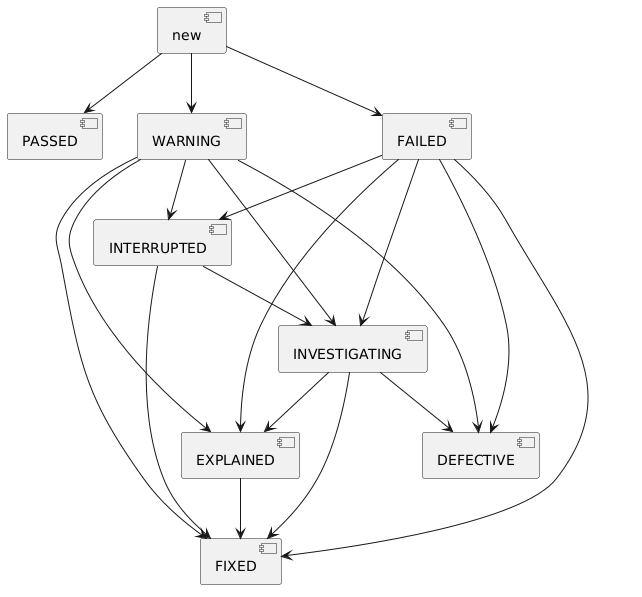
A run in WARNING or FAILED can be set to FIXED directly. Since FIXED counts as passed, this single change
can make the build eligible for a promotion, including an automatic one.
In the builds grid of a branch page, and in the "Validations" table of a build page, clicking the status of a validation run opens a small popover:
- one button per status the run can move to,
FIXEDfirst when it is one of them — one click applies it; - With comment… to pick a status and give it a description;
- History… to display all the runs of this validation stamp for this build, and their statuses.
The popover reads the current status of the run when it opens. Users who are not allowed to change the status of validation runs only see History….
Promotions
A promotion level can be granted to a build. This is called a promotion or promotion run. This can happen several times for a given promotion level and a given build.
A promotion is either granted or not granted. When promotion level fields are configured, field values can be associated with each promotion run.
Properties
Properties are heavily used in Yontrack to enrich the model with additional information. They can be attached to any entity in the model.
For example, in this documentation, we'll often talk about the "release label" of a build. This is actually represented by a property attached to the build.
Properties can be set by users using the UI, but more often than not, they are set automatically by the CI engine.
Note
The list of all existing properties is available in the reference.
Validation stamp types
Test summary
Value:
passed- Count of passed testsskipped- Count of skipped/ignored testsfailed- Count of failed tests
Configuration:
warningIfSkipped- If set to true, the status is set to warning if there is at least one skipped test.failWhenNoResults- If set to true, the status is set to failure if there is are no test at all.
CHML
This type means Critical / High / Medium / Low. It is used to represent the results of some scans (security, code quality, etc.).
Value:
CRITICAL- number of critical severity issuesHIGH- number of high severity issuesMEDIUM- number of medium severity issuesLOW- number of low severity issues
Configuration:
warningLevel:level: CRITICAL / HIGH / MEDIUM / LOWvalue: when the number of issues in thislevelis above this threshold, the validation stamp is in warning
failedLevel:level: CRITICAL / HIGH / MEDIUM / LOWvalue: when the number of issues in thislevelis above this threshold, the validation stamp is failed
warningPassesAutoPromotion: optional,falseby default. Whentrue, a run whose last status isWARNINGcounts as passed for the auto promotion — and only for it.
Percentage
Value: an integer between 0 and 100.
Configuration:
warningThreshold: integer between 0 and 100. If the value is below this threshold, the stamp is in warning.failureThreshold: integer between 0 and 100. If the value is below this threshold, the stamp is is failed.okIfGreater: boolean. If true, the stamp is OK when above the thresholds
Number
Value: any number
Configuration:
warningThreshold: integer. If the value is below this threshold, the stamp is in warning.failureThreshold: integer. If the value is below this threshold, the stamp is is failed.okIfGreater: boolean. If true, the stamp is OK when above the thresholds
Metrics
This type is used collect arbitrary metrics, the associated of names with measurements.
Value: a map of measurements (name --> double)
Configuration: none
Run info
Both builds and validation runs can have some run information attached to them.
This is a object which contains the following information about the run (build or validation):
sourceType- Type of source (like "jenkins")sourceUri- URI to the source of the run (like the URL to a Jenkins job)triggerType- Type of trigger (like "scm" or "user")triggerData- Data associated with the trigger (like a user ID or a commit)runTime- Time of the run (in seconds)